Voice Over Video Maker — Turn a Script Into a Vertical Short
Pick an AI voice, write your narration scenes, drop it over background footage, and export a captioned 9:16 short — ready for TikTok, Instagram Reels, or YouTube Shorts. No recording. No camera. No editing software.
What It Is
A Voice Over Video Maker — Not Just a Text-to-Speech Tool
If you searched text to speech video maker expecting a plain TTS converter, Brainrot Shorts goes further. You write the narration script, pick a voice, and the tool assembles a full vertical short: AI narration over a looping background clip, captions baked in, optional music underneath — exported as an MP4.
The output is a finished narration video ready to post — not an audio file, not a waveform animation, not a slideshow. It is a 9:16 captioned short built for TikTok, Instagram Reels, and YouTube Shorts, from a script you write in under five minutes.
AI narration over real background footage
Not just an audio file or TTS clip
Auto-captions baked into the video
Style, grouping, and position you control
Exports as a 9:16 vertical MP4
Not a waveform or podcast export
Built-in background footage — no uploads required
98 vertical clips ready to go
Features
Everything in the Voice Over Video Maker
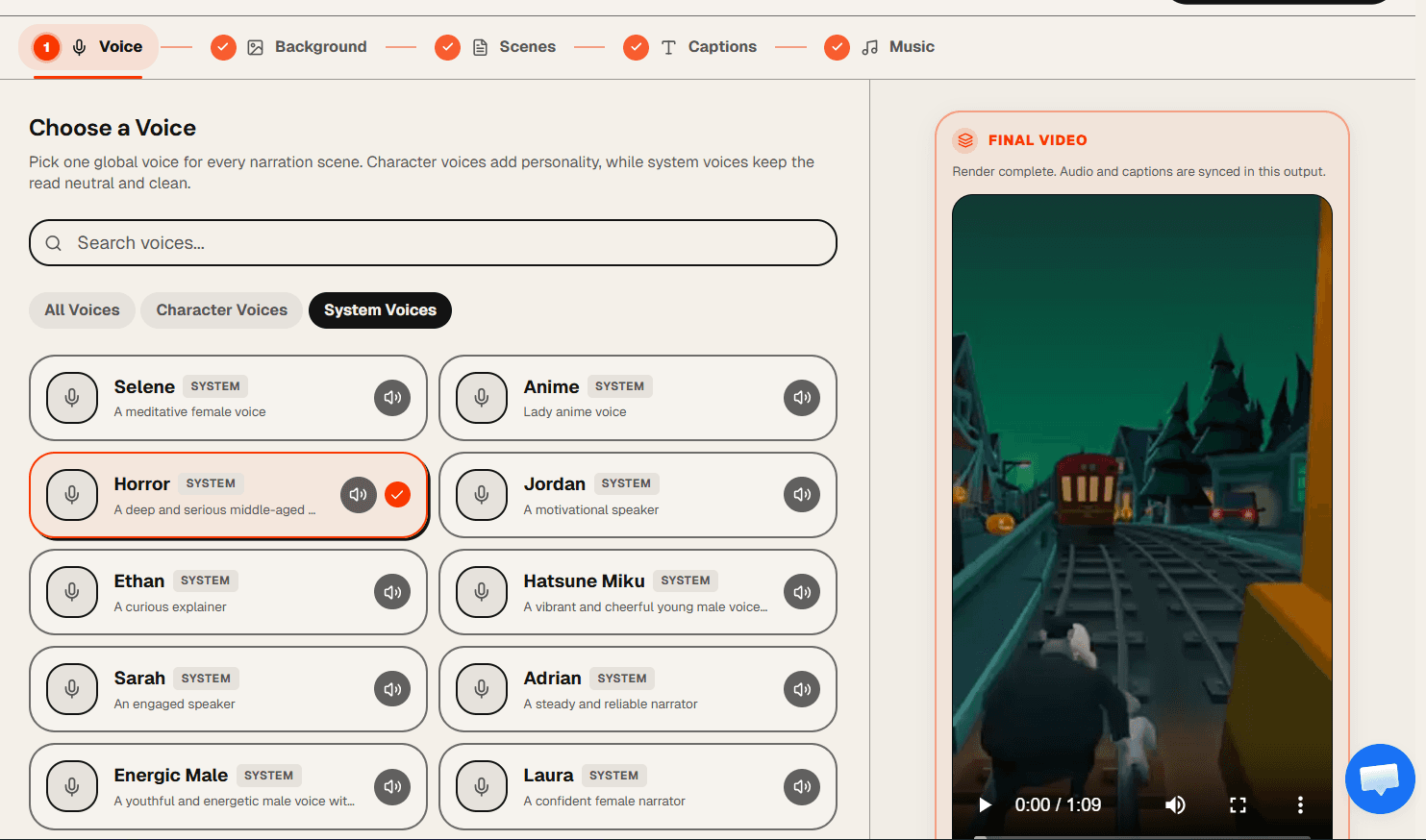
One Voice, Every Scene — Pick From 40+ AI Options
Choose one character voice or system voice to narrate your entire video. From Peter Griffin and Stewie to clean neutral voices, every option is previewed before you commit. One voice, consistent narration, start to finish.
Built-In Background Footage Library
98 vertical background clips included — Minecraft parkour, anime footage, and more. Browse by category and select one clip to run behind the entire narration. No upload needed.
AI Script Writer (Lite+)
Describe your topic, pick a style — Storytime, Documentary, Tutorial, Motivational, Listicle, or Product Pitch — and get a full narration script back. Edit it scene by scene before generating audio.
Drag-and-Drop Narration Scenes
Add as many scenes as you need, reorder them by dragging, and preview each scene's AI narration audio before you render. Catch pacing issues before the final export.
Auto-Captions With Full Style Control
Captions are generated automatically from the narration audio. Choose a caption style, set words-per-group for readability, and drag the vertical position to wherever it fits best in your composition.
Background Music + 1x–2x Export Speed
Add a background music track with its own volume control. Speed the whole video up to 2x at export time — voice, captions, and visuals stay aligned. No re-recording required.
How It Works
How to Make a Voice Over Video in 5 Steps
Pick a voice
Browse 40+ AI character voices and system voices. Preview each one before committing. The voice you pick narrates every scene in the video — one consistent voice, start to finish.
Choose background footage
Pick one background clip from the built-in library of 98 vertical videos — Minecraft parkour, anime footage, and more. The clip runs behind your narration for the full length of the video.
Write narration scenes — or let AI draft them
Add scenes and type the narration text for each one. Or open the AI script writer, describe your topic and style, and get a full narration script generated for you. Preview per-scene audio before you move on.
Style captions
Pick a caption style from the style library, set words-per-group for readability, and drag the vertical position to where it looks best. Captions are auto-generated from the narration audio.
Add music and render your video
Select a background music track and set its volume. Optionally speed the export up to 2x. Hit render — Brainrot Shorts composites the narration, captions, and footage into a 9:16 MP4 ready for TikTok, Instagram Reels, or YouTube Shorts.
Use Cases
What Creators Make With This Voice Over Video Generator
The narrated short-form video is one of the most scalable formats on TikTok, Reels, and Shorts. Here is how creators are using it.
Faceless Narration Channels
Run a narration video channel without filming yourself. Write a script, pick a voice, render. Post daily without ever appearing on camera — the faceless creator model that scales.
Example concept:
"5 dark psychology tactics most people don't know"
Explainer Videos
Add AI voice to video walkthroughs and concept breakdowns. One clear narration voice over a relevant background clip makes complex ideas digestible in under 60 seconds.
Example concept:
"How compound interest actually works in 45 seconds"
Story Read Videos
The narration video maker for Reddit-style story reads and AITA content. Write the story as scenes, let the AI voice read it aloud, and export a captioned short.
Example concept:
"AITA for telling my boss I won't work weekends anymore"
Motivational & Listicle
Listicles, tips, and motivational content narrated by one consistent AI voice over looping footage. The text to speech video maker format that keeps completion rates high.
Example concept:
"3 things successful people do before 7am"
Mini-Documentary Style
Single-narrator documentary-style shorts with a voice over video generator. Write scene-by-scene narration, pair it with footage, and export a short that feels produced.
Example concept:
"The rise and fall of Blockbuster — 60 second version"
Faceless Content Scaling
Creators managing multiple niche channels use the voice over generator to publish narration videos across topics without recording audio or video themselves. One workflow, unlimited content pillars.
Example concept:
"Finance, true crime, and history — three channels, one tool"
About the Format
What is a voice over video maker?
A voice over video maker is a tool that takes a written script, applies an AI voice to narrate it, and wraps the result in a complete video file — background footage, captions, and optional music included. Unlike a plain TTS converter that outputs an audio clip, Brainrot Shorts outputs a vertical MP4 you can post directly to TikTok, Instagram Reels, or YouTube Shorts.
The distinction matters for creators. A text to speech video maker handles the entire production layer — not just the audio. You write the script, and the tool takes care of narration generation, caption timing, and video compositing. The result looks produced without any editing software.
How is this different from a text-to-speech converter?
A text-to-speech converter gives you an MP3. A narration video maker gives you a finished video. Brainrot Shorts generates the narration audio, syncs it to captions, composites it over a background clip, and exports a 9:16 MP4 — everything a short-form platform needs in a single file.
If you want to add AI voice to video, the workflow is: pick a voice, write the narration scenes, let the tool generate and sync the audio, then render. You are not manually recording, editing waveforms, or aligning captions by hand.
Why narration videos perform on TikTok, Reels, and YouTube Shorts
The narrated short format works because captions keep audio-off viewers engaged while the voice keeps audio-on viewers listening. Pair that with looping background footage — Minecraft parkour is the most-watched example — and you have a video that holds attention even during a topic that would otherwise cause viewers to scroll past.
The AI voice over video format is particularly effective for faceless channels because there is nothing to film. Write the script, render the video, post it. Many creators managing multiple niche channels use a video voice over generator to publish consistently without appearing on camera or recording voiceovers manually.
Are AI narration videos monetizable?
Yes. The script, voice selection, and visual style are your original creative choices. Many creators run faceless narration channels on TikTok and YouTube Shorts that qualify for platform monetization programs — TikTok Creativity Program and YouTube Shorts RPM. Brainrot Shorts removes the watermark on paid plans, which is a requirement for most platform monetization reviews.
Related
Other Tools From Brainrot Shorts
AI Voice Library
Browse 40+ character voices and system voices. Find the right narrator for your short before you start building.
BackgroundsMinecraft AI Video Maker
67 Minecraft parkour backgrounds available in the voice over editor. See all background options and styles.
Sibling EditorReddit Story Generator
Turn Reddit posts into viral narrated shorts. Multi-voice support — different characters for different comments.
Sibling EditorTexting Story Maker
Build iMessage-style fake chat conversations with AI voices and export as vertical short-form videos.
FAQ
Voice Over Video Maker — Frequently Asked Questions
A voice over video maker is a tool that takes a written script, applies an AI voice to narrate it, and produces a complete video file — background footage, captions, and music included. Brainrot Shorts exports a 9:16 MP4 ready for TikTok, Instagram Reels, or YouTube Shorts. It is not just a text-to-speech converter; the full video production layer is handled for you.
No. Brainrot Shorts is built for faceless creators. You write the script, pick an AI voice from the library, and the tool generates the narration. No microphone, no camera, no recording required. The output is a finished short-form video you can post directly.
In the AI Voice Over Video editor, backgrounds come from the built-in library of 98 vertical clips — you choose one clip to run behind your narration. This is a narration-first workflow: you start with a script and let the tool build the video around it. If you need to use your own footage, Brainrot Shorts also offers the Reddit Story and Texting Story editors which support custom background uploads on Hobby and above.
Brainrot Shorts has 40+ AI voices - character voices like Peter Griffin, Stewie Griffin, Rick Sanchez, SpongeBob, Goku, and more, plus clean system voices for narration. You pick one voice for the entire video and preview it before committing. Free access includes a limited voice set; paid subscriptions unlock the full library. Browse all voices at /ai-voice.
Not in the AI Voice Over Video editor — this workflow uses one global voice that narrates all scenes consistently. If you want multiple different voices in one video — for example, a conversation between two characters — use the Reddit Story Generator or Texting Story Maker editors, which support per-participant voice assignment.
No. Brainrot Shorts does not support voice cloning, voice uploads, translation, or dubbing. Voices come from a curated library of character and system voices. The narration is generated from the text you write in the editor.
Yes, on Lite plans and above. The AI script writer inside the editor lets you describe your topic, choose a style preset — Storytime, Documentary, Tutorial, Motivational, Listicle, or Product Pitch — and set a target duration. It generates a full multi-scene narration script you can edit before generating audio.
Captions are generated automatically from the narration audio. In the Captions tab you can choose a caption style from the style library, set words-per-group for readability, and drag a slider to control vertical position. Captions are baked into the final render — no separate subtitle file needed.
Brainrot Shorts exports a 1080×1920 MP4 in 9:16 vertical format — the standard for TikTok, Instagram Reels, and YouTube Shorts. The narration audio, captions, background footage, and optional music are all composited into one file. No additional editing is required.
Lite ($19/mo), Hobby ($39/mo), Creator ($49/mo), and Pro ($99/mo) include watermark-free exports. Removing the watermark is recommended for any channel building toward TikTok Creativity Program or YouTube Shorts RPM monetization.
Make Your First Narration Video in Under Five Minutes
Write a script, pick an AI voice, choose background footage, and export a captioned 9:16 short ready for TikTok, Instagram Reels, or YouTube Shorts. No recording. No editing. paid plan.