Texting Story Maker — Turn Fake Chats Into Viral Videos
Build an iMessage-style fake text conversation, assign AI voices to each contact, drop it over gameplay footage, and export a vertical short-form video — ready for TikTok, Instagram Reels, or YouTube Shorts. No video editing required.
What It Is
A Fake Text Message Video Generator — Not Just a Screenshot Tool
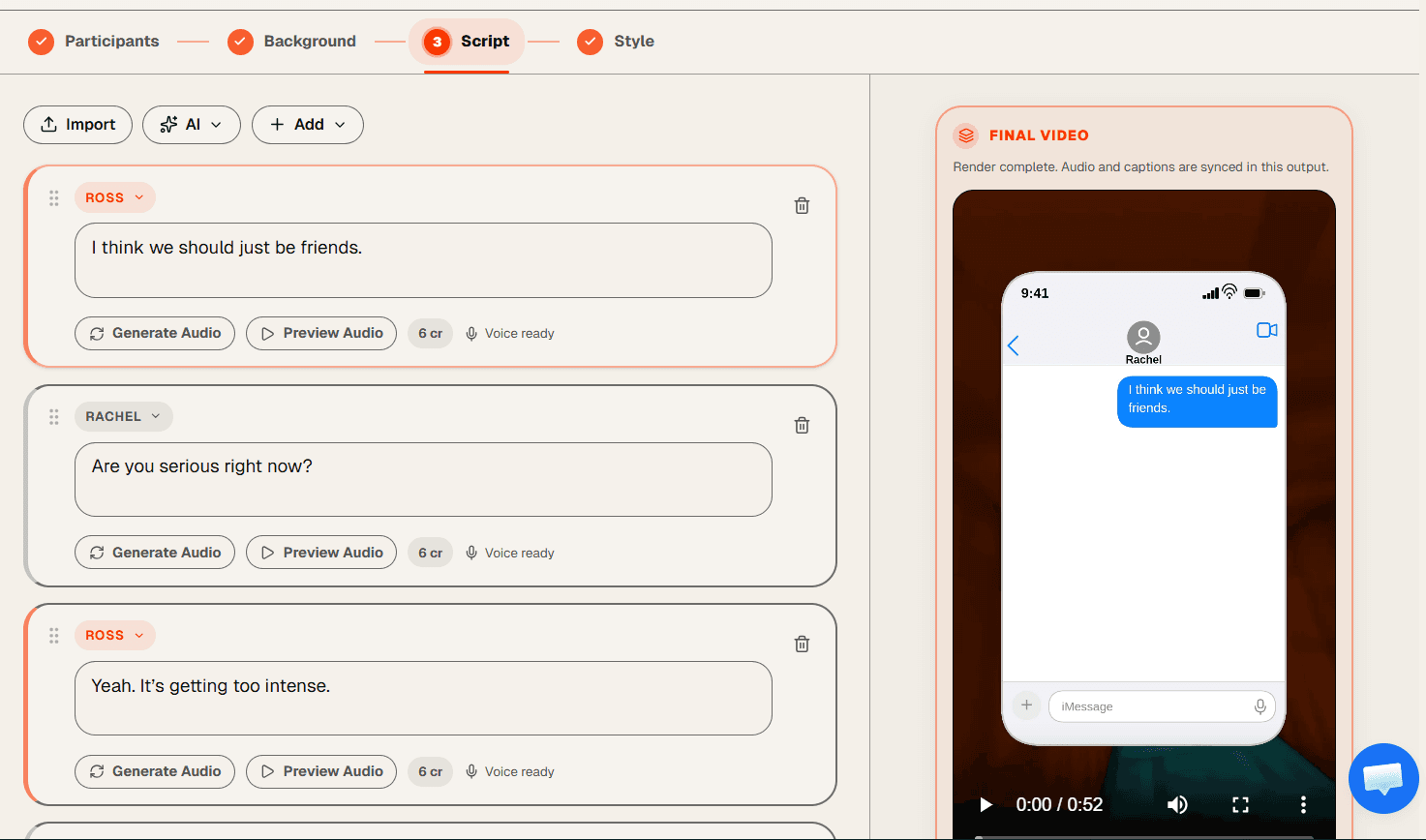
If you searched fake text message generator expecting a screenshot app, Brainrot Shorts goes further. You build the fake conversation, then the tool animates it frame by frame over a gameplay background with AI voices reading each message aloud — and exports it as a vertical video file.
The result is a TikTok- or Reels-ready video where the iMessage chat appears in real time — each text bubble arriving on cue, narrated by the AI voice you assigned to that contact. It's the chat story format that drives millions of views every week on short-form video, without the manual screen-recording and editing.
Animated iMessage-style chat
Not a static screenshot
AI voices narrate every message
No recording needed
Exports as 9:16 vertical video
Not a PNG or GIF
Gameplay footage runs underneath
Keeps viewers watching
Features
Everything in the Texting Story Maker
Animated iMessage Chat UI — Not a Static Screenshot
Every message appears on screen timed to the AI voice narrating it. Blue or green bubbles, light or dark theme, iPhone status bar, contact header with avatar — the full iMessage look, animated frame by frame inside your video.
Multiple Contacts, Individual AI Voices
Add participants and assign each one a different AI character voice. Peter Griffin as the sender, Stewie as the receiver — or any combination from the 40+ voice library.
AI Script Generator for Chat Conversations
Describe the drama and let the AI write the full conversation. Or write it yourself line by line, assign each message to the right contact, and add image messages where needed.
Gameplay Backgrounds That Hold Attention
98 background videos included — Minecraft parkour, anime clips, and more. The looping footage keeps viewers watching all the way to the last message.
Full Chat Appearance Controls
Switch between light and dark mode. Choose blue (iMessage) or green (SMS) bubble color. Toggle the chat header on or off, set the unread badge count — style every detail before you render.
One-Click Vertical Video Export
Export at 1080×1920 in 9:16 ratio — an MP4 ready for TikTok, Instagram Reels, and YouTube Shorts. Background, chat animation, and AI audio are all composited in. No editing software required.
How It Works
How to Make a Texting Story Video in 5 Steps
Add participants and assign AI voices
Name your contacts, set their role (sender or receiver), upload an avatar, and pick a voice from the 40+ AI character library. Each contact gets their own voice.
Write or AI-generate your conversation
Type messages line by line and assign each one to the right contact - or describe the scenario and let the AI write the full chat conversation for you, including image messages.
Pick a gameplay background
Browse 98 backgrounds - Minecraft parkour, anime footage, and more. The looping video plays underneath the chat and keeps viewers engaged until the last message appears.
Style the chat appearance
Choose light or dark mode, blue or green bubbles, and whether to show the chat header. Preview the full conversation animated inside a phone mockup before you render.
Render and export your texting story video
Hit render. Brainrot Shorts composites the chat animation, AI voices, and background into a 9:16 MP4. Download and post directly to TikTok, Instagram Reels, or YouTube Shorts.
Use Cases
What Creators Make With the Chat Story Maker
The iMessage-style chat story is one of the fastest-growing formats on TikTok, Reels, and Shorts. Here is what the best-performing niches look like.
Drama & Tea
Fake texts revealing a cheating partner, a family feud, or an entitled coworker. The "wait she actually said that" format is one of the highest-completion formats on TikTok.
Example concept:
"My roommate texted my boyfriend and this is what happened"
POV Storylines
First-person scenarios told entirely through a fake iMessage thread. The viewer plays one side of the conversation while the other contact drives the drama.
Example concept:
"POV: your ex texts you 3 years later"
Confession & Revenge
Malicious compliance, petty revenge, and satisfying confrontations shown as fake text exchanges. Longer story arcs work well for the YouTube Shorts audience.
Example concept:
"I found out my boss was stealing my tips and I did this"
Fan Fiction & Celebrity
Fictional conversations between characters or public figures in iMessage format. The chat story format makes fan fiction instantly shareable and scroll-stopping.
Example concept:
"What if Kendall texted Travis first"
Horror & Thriller
Suspenseful fake texts where something goes wrong message by message. The gradual reveal keeps watch-time high as viewers wait for the next bubble to appear.
Example concept:
"The last texts between my sister and the stranger"
Humor & Skits
Absurd, relatable, or chaotic fake text conversations written as comedy sketches. Blue bubble on one side, green on the other — classic chat story humor format.
Example concept:
"Texting my landlord like a CEO"
About the Format
What is a texting story maker?
A texting story maker is a tool that lets you build fake text message conversations and turn them into short-form videos. Instead of manually screen-recording a fake iMessage thread or stitching screenshots together in a video editor, a texting story maker handles the animation, the audio, and the export automatically.
Brainrot Shorts is a text message video maker built specifically for short-form creators. You write the fake conversation in the editor, and the tool exports a vertical 9:16 MP4 with the chat animated on top of gameplay footage — ready to post directly to TikTok, Instagram Reels, or YouTube Shorts.
How is this different from a fake iMessage generator or screenshot tool?
Most fake iMessage generators produce a static screenshot — useful for memes, but not for video content. A fake text message video generator like Brainrot Shorts produces an actual video file: each message appears on screen at the right moment, narrated by an AI voice, with background gameplay running underneath.
The distinction matters for creators. A screenshot can only be posted as an image. A video can be posted to TikTok For You, Instagram Reels, and YouTube Shorts — formats that drive significantly more reach and are monetizable through TikTok Creativity Program and YouTube Shorts RPM.
Why use a chat story maker for TikTok and Reels?
The chat story format works because it mimics the experience of reading a real conversation — and viewers are trained to read to the end of a text exchange. Pair that with an AI voice reading each message aloud and gameplay footage running underneath, and you have a format optimized for audio-on and audio-off watch behavior on every major short-form platform.
Brainrot Shorts lets you produce that format without video editing experience. The fake text generator side of the tool handles the iMessage visual — you write the conversation, and the video side handles everything else. The result is a TikTok-ready, Reels-ready, or Shorts-ready video that looks like a legitimate screen recording, with a voice telling the story.
Are texting story videos monetizable?
Yes. You are creating original content — the script, the voice assignment, and the visual design are yours. Many creators run faceless texting story channels on TikTok and YouTube Shorts that qualify for platform monetization programs. Brainrot Shorts removes the watermark on all paid plans, which is a requirement for most platform monetization reviews.
FAQ
Texting Story Maker — Frequently Asked Questions
Every account starts with 240 free credits and a limited voice/background set. Paid subscriptions unlock the larger library.
Most fake text generators produce a static PNG screenshot. Brainrot Shorts produces a vertical video file: each message appears animated on screen at the right moment, narrated by an AI voice, with gameplay footage running underneath. The output is a 9:16 MP4 ready for TikTok, Instagram Reels, or YouTube Shorts.
Yes. You can add multiple participants and assign each one a different role (sender or receiver) and a different AI voice. Each contact gets its own name and avatar, so the conversation can involve multiple people across the same chat.
Brainrot Shorts has 40+ AI character voices including Peter Griffin, Stewie Griffin, Rick Sanchez, Goku, SpongeBob, and more. Each voice is assigned to a specific participant in the conversation - so one contact might speak in Peter Griffin's voice and another in Stewie's. Free access includes a limited set; paid subscriptions unlock the full library.
Yes. The AI script generator inside the text story editor lets you describe your scenario and generates a complete chat conversation for you. You can edit it line by line, reorder messages, and add or remove participants before rendering.
98 gameplay backgrounds are available, including Minecraft parkour, anime clips, and more. The footage loops under the chat conversation and keeps viewers engaged throughout the video.
Yes. The style tab in the editor lets you switch between light and dark mode for the iPhone UI, choose blue (iMessage) or green (SMS) bubble color, toggle the chat header, and set the unread message badge count. You can preview all style changes live before rendering.
Brainrot Shorts exports a 1080×1920 MP4 in 9:16 vertical format — the standard for TikTok, Instagram Reels, and YouTube Shorts. The chat animation, AI voices, and background footage are all composited into one file. No additional editing required.
Yes. You are creating original content with your own script, voice assignment, and visual style. Many creators run faceless texting story channels that qualify for TikTok Creativity Program and YouTube Shorts RPM monetization. Brainrot Shorts removes the watermark on all paid plans, which is required for platform monetization reviews.
Lite ($19/mo), Hobby ($39/mo), Creator ($49/mo), and Pro ($99/mo) include watermark-free exports - recommended for any channel building toward monetization.
Yes. Paid subscriptions let you upload your own background videos — custom gameplay recordings, stock footage, or any vertical video you want to use as the background layer. The 98 built-in backgrounds are also still available.
There is no fixed length limit — the video length is determined by how many messages are in the conversation and the duration of each AI-narrated line. For TikTok and Reels, 30 to 90 seconds is the sweet spot for completion rates. For YouTube Shorts, 60 seconds maximizes eligibility for the Shorts monetization pool.
Free tools
Free fake chat generators for your texting stories
Need a still screenshot instead of an animated thread? These free generators recreate iMessage, WhatsApp, Instagram DMs, and the lock-screen notification that sets the story up — download as PNG in seconds.
Fake Text Generator
Generate realistic iMessage-style conversation screenshots for your videos and social content.
Fake WhatsApp Generator
Create realistic WhatsApp chat screenshots with custom contacts, blue ticks, timestamps, and dark mode.
Fake Instagram DM Generator
Create realistic Instagram DM screenshots with chat themes, reactions, seen receipts, and verified badges.
Fake iOS Notification Generator
Build an iPhone lock screen with stacked notifications, or a single push banner on a transparent background.
Start Making Texting Story Videos Now
Build iMessage-style fake text conversations, assign AI voices, add gameplay footage, and export vertical videos for TikTok, Reels, and Shorts. paid plan. No video editing required.