Until recently, "make a music video with AI" meant one of two disappointments: a visualizer (pulsing shapes that react to the waveform) or a slideshow (your song under stock footage with crossfades). Neither looks like anyone directed anything, and feeds can smell it instantly.
What changed is that the whole director's job can now run as a pipeline: read the song, pick the moment, design a world, shoot it, cut it. This guide walks through that pipeline from the user's side — what you decide, what the AI decides, and where a little direction from you makes an outsized difference.
Step 1: pick your door in
There are three ways to start, and they're genuinely different workflows:
| You have | Do this |
|---|---|
| A finished track (MP3/WAV you own) | Upload it directly |
| A song you generated in the studio | Pick it from your takes — one click |
| No song yet, just an idea | Describe it; the song gets generated first, then its video |
The third door is the one most people don't expect to exist. Type "a hard-hitting rap track about grinding at 4am while everyone else sleeps" and the studio writes and performs that song, then immediately directs its music video. Idea to postable video, one sitting, no files moved between tools.
If you're starting from words you've already written, generate the track with Lyrics to Song first — your exact lyrics, performed — and it shows up in the picker here. Songs made from a photo with Image to Music work the same way.
One honest note on uploads: it has to be music you have the rights to — your own tracks, tracks you generated, or licensed music. A commercial release from your library isn't that, and the platforms' content matching would flag the video anyway.
Step 2: pick the style like a director, not a filter
The three styles change what gets generated, not how it's tinted:
- Cinematic — moody, filmic shots that tell a story around the song. One subject, one world, real-camera light. The safest strong choice for rap, R&B, indie, and anything narrative.
- Performance — an AI artist sings the big lines to camera, intercut with cinematic shots. Pick it when the vocal is the star and the chorus deserves a face.
- Animated — fully stylized: bolder colors, looser physics, more motion per scene. Reads instantly on a small screen; great for electronic, pop, and anything playful or surreal.
If you're torn, Cinematic first. It gives the AI the widest room to build a world around your lyrics, and it's the style that degrades most gracefully when a song's mood is ambiguous.
Step 3: let it find the chorus (this is a feature, not a limitation)
You pick a target length — 30, 45, or 60 seconds — and the AI picks which 30–60 seconds of your song to use. It transcribes every word with its timing, maps where the track gets loud, and looks for the repeated lyric block with the most energy: almost always the chorus and its lead-in.
This is the single biggest difference from full-length video makers, and it's deliberate. On a vertical feed, a four-minute video buries your best fifteen seconds three minutes deep. The chorus-first cut puts the peak of your song in the first moments of the clip, where a feed actually samples it.
Step 4: direct the look — or don't
Both optional controls live on the same screen:
- A look description is one sentence of art direction: "neon-lit rooftops in the rain, everything teal and orange", "grainy 90s home video, golden hour". The AI follows it closely. Describe a world, not a shot list — it's directing twelve scenes, not one.
- A reference image anchors the main subject. Upload it and the person in your video stays consistent with it across every shot.
Leave both empty and the AI invents a concept from the lyrics and mood — and here's the part worth knowing: every generation directs a fresh video. The same song run twice returns two different worlds. These two frames are from two runs on the same rap track, no look description either time:
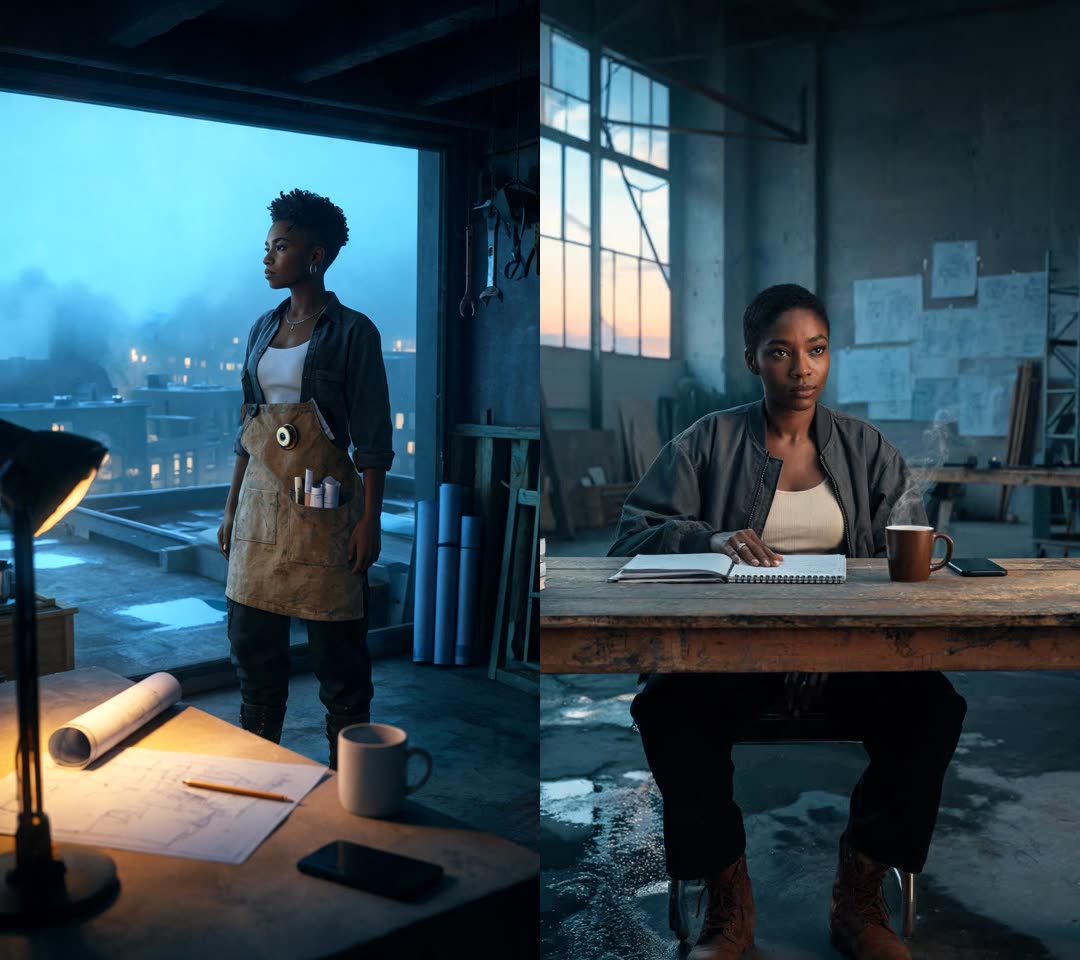
Both are watchable on the AI Music Video Generator page next to the exact song that produced them. If the first run isn't the world you imagined, run it again or spend one sentence steering it — that sentence is the highest leverage control on the page.
Step 5: generate, and know what the wait is
Click generate and the stages play out in front of you: listening to the lyrics, feeling out the beat, picking the best part, creating the visuals, cutting the final video. Typically the whole run lands in under ten minutes, and you don't need to keep the tab open.
What you get back is a normal MP4 — vertical 1080×1920, your song as the only audio, loudness set for the feed. No watermark removal step, no export settings, no editor. Upload it to TikTok, Reels, or Shorts as-is.
Why the cuts feel edited instead of generated
The detail that separates a music video from a slideshow is where the cuts land. This generator places them on the lyric-line starts it learned during transcription, with the song's tempo grid subdividing longer instrumental stretches — so a new shot arrives when a new line arrives. It's the same instinct a human editor follows, done from the transcript instead of by feel, and it's why the result reads as "cut to the song" even before you consciously notice the timing.
Who actually makes these (it's not just artists)
The phrase "music video" makes everyone picture a musician promoting a single. That's one door of several, and knowing the others changes what you might make this week:
- Artists releasing a single — the classic case. Tease the chorus on Shorts and Reels before the drop; Cinematic or Performance style.
- AI musicians — a track made in any AI music app usually lives behind a static cover image. A video turns "here's a file I generated" into something a feed treats like a release.
- Kids' songs — a song about dinosaurs or bath time becomes a bright Animated video a kid will ask to replay. One look-description sentence — "a friendly cartoon fox in a sunny forest" — casts the star. This is the format children's music lives in on YouTube, and the generator page has a fox-on-a-bike example made exactly this way: one sentence in, song and video out.
- Birthdays, weddings, gifts — generate a song about someone — their name in the chorus, the inside jokes in the verses — then hand them its music video. As a gift category this is almost comically underused.
- Brands and small businesses — a jingle or promo track becomes a 30-second feed-native ad with actual scenes, instead of a slideshow of product photos.
- Meme songs — full cinematic production value on a completely unserious track is a reliable bit. The more serious the video takes the joke, the better it lands.
The reason one tool covers that whole range: nothing about the visuals is canned. The subject, the world, and the grade are invented per song — so the same pipeline that gave a 4am grind anthem a rain-soaked rooftop gives a lullaby a watercolor bedtime forest.
Where to go from here
- Song and video in one flow, starting from nothing: the AI Song Generator — and the guide to making a song with AI covers the briefing craft that makes the song good before the video starts.
- Want the artist's face carrying the words instead of a directed world? The AI Lip Sync Generator performs your track on a face, mouth matched to every word.
- Rewriting a known song's words before you shoot it? That's the Song Lyric Changer.
The song stuck in your head can be a finished, directed, vertical music video before you finish your coffee. Start at the AI Music Video Generator.