Ask most people what an AI text story generator is for and you get the same answer: fake conversations. Relationship drama, cheating confessions, a creepy unknown number at 3am. That reputation is fair. It is where the format started and where most of the volume still is.
But looking at what people actually build with Brainrot Shorts, the picture is broader. Founders script conversations between a customer and a support agent. Course creators write a student asking the question they get every week. Marketers rebuild a real sales objection and answer it in eight messages.
The message thread has stopped being a gimmick for fake stories and become a storytelling format in its own right, the same way the tweet screenshot became one. It carries dialogue, tension, and information inside a container every viewer already knows how to read.
What is an AI text story generator?
An AI text story generator turns a scripted conversation into an animated chat video. You write the messages, or describe the scenario and let the AI draft them, then assign each line to a participant. The thread is rendered as a video where messages arrive one at a time, with some mix of:
- iMessage-style or SMS-style bubbles, in light or dark mode
- typing indicators and message sound effects
- contact names, avatars, and a chat header
- background footage behind or beneath the phone
- AI voices reading each participant's messages
- captions, music, and a vertical export for short-form platforms
The output is one MP4, usually 1080x1920, that plays anywhere a short-form video plays.
Why text-message videos work
A few structural advantages hold whether you are telling a ghost story or explaining a refund policy.
The interface is familiar. Nobody has to be taught how to read a chat thread, so attention goes to the words rather than the layout.
Speaker attribution is free. Bubble side and color tell viewers who is talking. No name tags, no narrator explaining who said what.
Conversations open loops. A question sitting on screen with no reply yet is a small unresolved thing, and unresolved things keep people watching.
Information arrives in fragments, one idea per message, which suits anything you would otherwise cram into a paragraph.
It is mobile-first by construction, and it works with sound on or off. Voices help, but the bubbles carry the story alone when someone is scrolling silently.
These are reasons the format is easy to consume, not a guarantee of reach. A boring conversation rendered beautifully is still a boring conversation.
12 ways people use text story videos
1. Fictional storytelling
The original use case, and still the largest. Creators write romance arcs, friendship fallouts, cheating reveals, mysteries, and twist endings as a thread between two characters.
Fiction told through messages skips the scaffolding. There is no "she walked into the room" line to write, because the reader infers everything from timing, tone, and what goes unsaid.
A typical example: someone forwards a screenshot they were not supposed to see, the replies get shorter, and the video ends mid-thread. Part two goes up tomorrow. Best for faceless story channels and serialized fiction accounts, where a recognizable pair of characters can carry dozens of episodes.
2. Horror and suspense stories
Messages from an unknown number, a thread with someone who is supposed to be dead, texts arriving with tomorrow's timestamp, a missing person's last conversation.
Horror suits the format better than almost anything else because the medium withholds. You never see the sender. A three-second pause before a reply does the work a jump scare does in film, and the small screen keeps the fear close.
Example: a person texts their sibling from an empty house, describes a sound downstairs, and gets back "I'm not home." Best for horror channels, creepypasta narrators, and anyone building a serialized unknown-number account.
3. Marketing and product promotion
A conversation where one person casually recommends a product, app, service, or shop to another, so it reads as a moment between two people rather than a pitch.
The format moves the sell into dialogue. Instead of claiming a product is good, you show one character stuck and another mentioning what fixed it. That is the structure of word of mouth, which is how most people actually find tools.
Example: one friend complains that editing eats every Sunday, the other says what they switched to, and the last message is a screenshot of the finished export. Our guide on making promotional videos for any product with AI covers the longer workflow. Best for small businesses, ecommerce brands, app marketers, and affiliates who need ad creative without a shoot.
4. Customer testimonials and social proof
Take a real piece of customer feedback and stage it as a conversation: the problem they had, what they tried, where they ended up.
Testimonials read flat when quoted and alive when conversational. A block quote on a landing page sounds like copy; the same words arriving as two people talking sound like a story, with the outcome landing at the end instead of the top.
Example: a customer messages a founder to say the product finally solved something they had worked around for months, and the founder asks what changed. There is a rendered version further down the page. Best for SaaS teams, agencies, coaches, and service businesses, with one requirement: keep it tied to feedback you actually received.
5. SaaS and app demonstrations
Instead of a screen recording, the product gets explained through a conversation between two users, a founder and a customer, or a user and a support agent.
This front-loads the problem. Screen recordings start at the interface, which only means something to people who already know the tool. A conversation starts at the frustration, which everyone understands, and reaches the feature as a consequence.
Example: a designer complains that handoff files keep drifting out of sync, a colleague explains how their team handles versioning now, and the thread ends on a short before-and-after. Best for SaaS founders, indie hackers, and product marketers who need social-first creative without polished UI footage.
6. Educational explanations
A student asks a teacher to explain something and the teacher answers in short messages. APIs, compound interest, recursion, photosynthesis, the causes of a war, anything that usually needs a paragraph.
The questioner can be as confused as the audience. When the student says "wait, so the API is the waiter?", the video is doing what a good explanation does: catching the misunderstanding out loud instead of talking past it.
Example: "explain what an API is like I'm five", six messages, then a question that sets up the next video. Best for teachers, course creators, study accounts, and technical educators. If you would rather narrate over visuals, the AI explainer video generator covers that side, and quiz videos pair well for testing recall.
7. Language-learning content
Realistic dialogue for ordering food, checking into a hotel, messaging a coworker, or arranging a date, shown as a chat with translations or key phrases surfaced as they appear.
Language is mostly used in exchanges, not in isolated sentences. A vocabulary list is hard to remember; a conversation gives every phrase a speaker, a position, and a reason.
Example: a thread between a traveler and a landlord about a broken heater, where the useful phrases are carried by the replies rather than listed separately. Best for language teachers, tutoring services, and learning apps that need daily short-form content.
8. Reddit story adaptations
Reddit posts, confessions, relationship threads, and advice posts get restaged as the conversation the post describes.
Most Reddit stories are already about a conversation. Reading the post aloud gives you a narrator summarizing an argument; rebuilding it as a thread gives you the argument itself, in present tense.
Example: an AITA post about a group chat falling apart becomes the group chat falling apart, with the poster's side told through what they send rather than what they report. Best for story channels already working with Reddit content. Our Reddit story video guide covers the narrated version, and the Reddit story generator handles that pipeline end to end.
9. Memes and comedy
Group chats, misread messages, autocorrect disasters, roommate disputes, workplace jokes, and gaming lobbies, where the humor is in the timing.
Comedy lives on beat placement, and message pacing is a punchline delivery system. The gap before the reply is the setup; the two-word answer is the joke.
Example: a manager posts a wall of text about "quick alignment" and the only reply is "on PTO." Best for meme pages, niche community accounts, and brands with enough personality to joke about their own industry.
10. Customer-support simulations
Common problems and their fixes, staged as a support thread: onboarding steps, FAQs, refunds, shipping updates, or a troubleshooting sequence.
Support content is inherently a back-and-forth. A help doc lists steps out of context; a support conversation shows the step people actually get stuck on, in the order they hit it.
Example: a customer asks why an order has not moved in four days, and support explains what the tracking status means and what happens next. Post it once and it answers a question the inbox gets weekly. Best for ecommerce stores, SaaS support teams, and any business whose FAQ page is quietly the most-visited page on the site.
11. Recruitment and workplace training
Interview exchanges, manager check-ins, sales objection handling, feedback conversations, and communication lessons where the point is how something was said.
Workplace training is usually about phrasing, and phrasing is easier to judge read than described. Showing a weak version and a stronger version of the same message makes the lesson concrete in a way a list of tips never does.
Example: two versions of the same salary negotiation opener across two videos, with the whole difference sitting in the first sentence. Best for recruiters, HR and enablement teams, sales trainers, and career coaches.
12. Social-awareness and public-service content
Scam attempts, phishing messages, cyberbullying, manipulation patterns, and the early signs of a toxic relationship, shown as the conversation they actually arrive in.
These threats are delivered by message in real life, so reproducing the exact medium teaches recognition rather than vocabulary. Someone who has watched a fake delivery-fee scam play out in a chat window is likelier to spot the real one.
Example: a message claiming a parcel is held pending a small fee, with each manipulative detail called out as it appears, ending on what to do instead. Best for nonprofits, schools, banks, and public-safety communicators. Handle this one carefully: the goal is helping people recognize the pattern, not publishing a usable script for it.
A testimonial example, rendered
Here is use case 4 as an actual video: two participants, a short exchange, no narration needed to explain the setup.
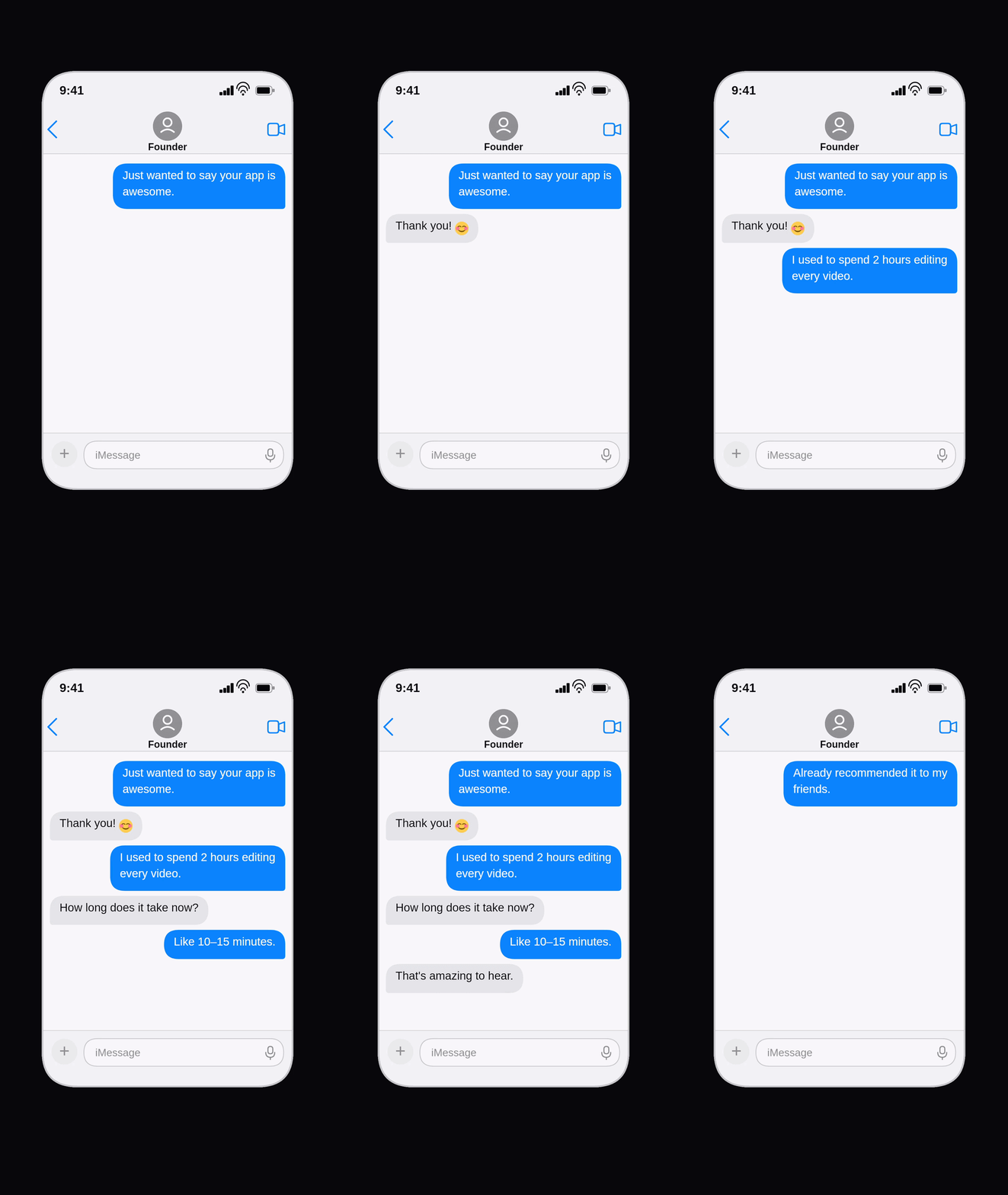
Note how little the video has to do. The contact name sets the relationship, the bubble color sets who is speaking, the message carries the point. Everything else is timing.
How businesses can use text story videos without making them feel like ads
Business use cases fail the same way when they fail: the conversation stops sounding like people and starts sounding like a landing page. A few things that keep it honest.
Start with the problem, not the product. The first message should be something your audience has thought. If it names your company, it is already an ad.
Write dialogue you would actually send. Short messages, contractions, lowercase where it fits. Nobody texts in full marketing sentences.
Delay the reveal. Give the conversation a few exchanges before the solution appears, so the viewer feels the problem first.
Keep messages short. One idea per bubble. Long paragraphs break the illusion and the pacing at once.
Sell the outcome, not the feature list. "I got my Sundays back" beats a list of specifications.
Do not invent customers. Dramatize real feedback and keep it recognizable to the person who gave it. Staging a fictional review as a genuine one is a different thing from telling a story, and regulators in several markets treat it that way.
Disclose sponsorship. If a creator is paid, label it, on the platform and in the video.
End with one small ask. A comment prompt, a link, a follow. One, and quiet.
How to create a text story video
- Pick the use case. Story, testimonial, lesson, demo, support thread. This sets the tone before you write anything.
- Define two characters. Names, relationship, and how each one writes. A manager and an intern should not text the same way.
- Write the conversation. Aim for 10 to 20 messages, then delete every line that only exists to explain something.
- Put a hook in the first three messages. A question, an accusation, a number, a contradiction. Whatever makes the next bubble worth waiting for.
- Generate the video. In Brainrot Shorts, add the participants, assign each one a voice, and let the messages be timed to the audio.
- Add the layer that fits. Gameplay footage behind the phone for story content, something quieter for business content, music where it helps. Voices come from the AI voice library if you want a character rather than a neutral read.
- Export vertical and post. One 9:16 MP4 covers TikTok, Instagram Reels, and YouTube Shorts. If you are running this as a funnel rather than a channel, our notes on turning short videos into an Instagram funnel go deeper.
Frequently asked questions
What is a text story generator?
A tool that turns a written conversation into an animated chat video. You write or generate the messages, assign each line to a character, and the tool renders the thread as messages appearing over time, usually vertical and often with voices and sound effects.
What are iMessage videos used for?
Fictional stories, horror series, Reddit adaptations, and memes, plus a growing set of business uses: product promotions, testimonials, app demos, support walkthroughs, language lessons, and workplace training.
Can businesses use fake text conversation videos for marketing?
Yes, and many do. The line is honesty. A dramatized conversation illustrating a problem is ordinary creative work. A fabricated conversation presented as a real customer review is not. Tie testimonials to real feedback, label dramatizations, and disclose sponsored content where required.
Are text story videos only for TikTok?
No. The same 9:16 export works on Instagram Reels and YouTube Shorts, and the format also lands well on landing pages, in onboarding emails, in ad creative, and inside internal training material.
Can I use a text message video generator for educational content?
Yes. Question-and-answer is a natural teaching structure, and the student character can ask exactly what your audience is wondering. It is widely used for explanations, vocabulary practice, and dialogue drills.
How long should a text story video be?
Most sit between 30 and 60 seconds, since pacing is set by how fast messages appear and how quickly people read. Longer stories usually do better split into a numbered series than stretched into one video.
Can text story videos include voiceovers?
Yes. Each participant can get a different AI voice, with messages timed to the audio. Voiceovers are optional, because the bubbles carry the story with sound off, but they generally improve completion.
How can I make a text conversation feel realistic?
Short messages, contractions, uneven rhythm. Let characters interrupt, reply late, or answer a different question than the one asked. The fastest way to break realism is to have someone speak in complete, well-structured sentences that nobody would type on a phone.
Is it legal to create fake iMessage conversations?
This is not legal advice, and the answer depends on your country and the platform. Fictional and dramatized conversations are common in entertainment and advertising. Risk appears when a video impersonates a real person or brand, defames someone, is used to defraud, exposes private messages, presents invented testimonials as genuine, misuses trademarks, or gets passed off as real evidence. If your video touches any of those, talk to a qualified professional before publishing.
What is the difference between a chat story generator and a text-to-video generator?
A chat story generator renders a conversation as an animated message thread, so the interface is the visual. A text-to-video generator turns a script or prompt into scenes and footage, where the words become narration instead of bubbles. Some projects use both: a chat opening as the hook, then a narrated section for the explanation.
The format is bigger than fake chats
Text-message videos are worth treating as a communication format rather than a genre. The container is a conversation, and almost anything worth explaining fits into one: a story, a lesson, an objection, a support ticket, a product finally clicking for someone.
The same nine messages that carry a horror twist can carry a customer's before-and-after, a manager's feedback, or the moment somebody realizes the text from their bank is not from their bank.
To try one, take a conversation you have already had this month that ended somewhere interesting and build it in the texting story maker. Write it, assign the voices, export it vertical. The first one takes about ten minutes.